I spent a weekend rebuilding a price comparison table that had been quietly wrong for months. The table looked fine from the outside — vendor, product, price, a link out — but every row was quoting a different vial size, so the cheapest-looking listing was frequently the most expensive thing on the page. Fixing it meant pulling live catalogs out of half a dozen Shopify storefronts, digging the strength out of variant titles that no two merchants format the same way, and rebuilding the page on a schedule so the numbers did not rot within a fortnight. What follows is the whole pipeline, including the parts that broke on me and the guardrails I bolted on afterwards. If you are building any comparison table where sellers package the same substance in different quantities, the shape of the problem is identical whether you are listing peptides, coffee beans, printer ink or CAT6 cable.
Why the raw price column misleads readers
Supermarkets solved this problem decades ago. Shelf labels in most of the United States and the EU carry a unit price — price per ounce, per 100 g, per litre — precisely because a 1.2 kg box and a 900 g box are not comparable at a glance. Online comparison tables almost never do this, and the omission is not neutral: it systematically flatters whichever vendor sells the smallest package.
The first catalog I pointed this pipeline at was a research-peptide storefront, and the mismatch was immediate. A listing on a vendor page like Maxxing Peptides might be a 5 mg vial while the visually identical row on the next site is 10 mg, so the one column your reader is actually scanning — the dollar figure — is the one number that cannot be compared. Sort that column ascending and you have built a table that recommends the wrong product, confidently, in a nice monospace font.
The fix is one derived field. Every row gets a normalised cents_per_mg, that becomes the default sort key, and the sticker price is demoted to supporting information. Everything else in this article exists only to make that one field trustworthy.
Checking whether products.json is actually open
Shopify storefronts publish a JSON feed of their published products at /products.json. It is the same data the storefront renders, no API key required, and it is dramatically more stable than scraping rendered HTML, because a theme change rewrites markup but rarely touches the feed. Before writing any code, check the endpoint by hand:
curl -s -o /dev/null -w "%{http_code}\n" https://store.example/products.json
curl -s "https://store.example/products.json?limit=5" | head -c 600
A 200 with a top-level {"products":[...]} object means you are in business. A 404, a redirect to the homepage, or an HTML error page means either the store is not on Shopify or the merchant has deliberately blocked the route, and you should respect that rather than route around it. Response headers are a quick platform fingerprint too — Shopify-hosted storefronts typically leak an x-shopid or x-sorting-hat-shopid header, visible with curl -sI.
Read /robots.txt on each target before you automate anything. Shopify ships a sensible default that blocks /checkout, /cart, /orders and internal search, and merchants can and do extend it. If a store disallows the path you want, the correct response is to drop that store from the table, not to spoof a browser.
One more scoping trick: /collections/<handle>/products.json returns the same objects filtered to a single collection. If you only care about one product family, that request is far cheaper than crawling a 4,000-SKU catalog and throwing 95% of it away.
Paging through a catalog without getting blocked
The feed defaults to a small page size and accepts ?limit= up to 250, with a ?page= cursor. You loop until the array comes back empty. The interesting part is not the loop, it is the manners:
const BASE = "https://store.example";
const sleep = (ms) => new Promise((r) => setTimeout(r, ms));

async function fetchCatalog() {
  const out = [];
  for (let page = 1; page <= 40; page++) {
    const url = `${BASE}/products.json?limit=250&page=${page}`;
    const res = await fetch(url, {
      headers: { "user-agent": "pricebot/1.0 (+https://example.com/bot)" },
    });

    if (res.status === 429 || res.status === 430) {
      const wait = Number(res.headers.get("retry-after") || 20);
      await sleep(wait * 1000);
      page--;                 // retry the same page
      continue;
    }
    if (!res.ok) throw new Error(`${res.status} on page ${page}`);

    const { products } = await res.json();
    if (!products.length) break;
    out.push(...products);
    await sleep(1200);
  }
  return out;
}
Three details earn their keep here. The 40 page ceiling is a fuse: without it, a store that ignores the page parameter and returns page one forever will happily fill your disk. The identifiable user agent with a contact URL means a merchant who notices the traffic can email you instead of banning your IP range. And the 1.2 second gap between requests keeps a full 3,000-product crawl at roughly twelve requests and fifteen seconds — there is no reason to hammer anyone for that.
Shopify's edge also serves a 430 in front of its bot mitigation, which most HTTP clients treat as a hard failure because it is not a standard status. Handle it alongside 429 or your job will die at 3am on a store that was merely asking you to slow down.
Parsing milligrams out of variant titles
Each product carries a variants array, and the variant is where quantity lives — usually in title or option1. In my sample of six stores I found all of these formats: 10mg, 10 mg, 10 MG, 10mg Vial, Kit - 10mg x 10, 1 Vial (2mg), Default Title, and a memorable Big Boy.
The formatting is the whole difficulty. A catalog like Peptides Clav keeps the strength in the option value where a regex can find it, while other Shopify themes push it into the product title, into a metafield the JSON feed never exposes, or nowhere at all. Write the parser to try several sources in order and to give up loudly:
const UNIT = /(\d+(?:\.\d+)?)\s*(mcg|ug|µg|mg|g)\b/i;
const PACK = /(\d+)\s*[x×*]\s*(\d+(?:\.\d+)?)\s*mg/i;

function toMilligrams(text) {
  if (!text) return null;

  const pack = PACK.exec(text);            // "10 x 10mg" => 100 mg
  if (pack) return Number(pack[1]) * Number(pack[2]);

  const m = UNIT.exec(text);
  if (!m) return null;

  const value = Number(m[1]);
  switch (m[2].toLowerCase()) {
    case "g":   return value * 1000;
    case "mcg":
    case "ug":
    case "µg":  return value / 1000;
    default:    return value;             // already mg
  }
}

function variantMilligrams(product, variant) {
  return (
    toMilligrams(variant.title) ??
    toMilligrams(variant.option1) ??
    toMilligrams(variant.sku) ??
    toMilligrams(product.title)
  );
}
Order matters: the pack pattern has to run before the plain unit pattern, or Kit - 10mg x 10 parses as 10 mg and you understate a kit by a factor of ten. The µ character shows up more than you would expect from stores that paste product copy out of a supplier PDF, so match it explicitly rather than hoping.
Anything returning null goes into a review.json file with the store, product handle and raw variant title. On my first full run 7% of variants failed to parse; after two rounds of reading that file and adding patterns it settled near 1%. Those stragglers are excluded from the table entirely. A row that is silently wrong is worse than a row that is missing.
Bundles, kits and sold-out variants
Every catalog contains rows that will win your sort for the wrong reasons. The recurring offenders:
- Sold-out variants.
variant.availableis a boolean in the feed. Keep the row so the vendor still appears, mark it clearly, and exclude it from "cheapest" claims — nothing erodes trust faster than sending a reader to an out-of-stock page you advertised as the best deal. - Placeholder and test SKUs. Prices of
"0.00","0.01"or"1.00"attached to titles containing "test", "sample" or "shipping protection" are not products. Filter on price floor and a small deny-list of title fragments. - Bundles that stack multiple compounds. A "starter stack" containing three different substances has no meaningful cost per milligram of any one of them. Detect multiple unit matches in a single title and route those to a separate section rather than the comparison table.
- Subscription pricing. The feed reports the one-time price. If the storefront shows a lower subscribe-and-save figure, your table will look out of date to anyone who checks. Either footnote it or state plainly that you quote one-time prices.
The deny-list approach beats cleverness here. I tried inferring bundles from tags first; tags are merchant-authored free text and were useless across stores. Twelve lines of explicit rules, reviewed once a month, have been more accurate than anything heuristic I attempted.
Storing prices as integer cents
Prices come out of the feed as strings — "price": "44.99" — with no currency code attached to the variant. Two rules save you a great deal of grief.
First, convert to integer cents immediately and never let a dollar float into arithmetic. Binary floating point cannot represent 0.1 exactly, so a per-unit division chain will hand you 8.799999999999999 and your table will render $8.80 on one row and $8.8 on another depending on where you rounded.
function toCents(price) {
  const n = Number(price);
  if (!Number.isFinite(n) || n <= 0) return null;
  return Math.round(n * 100);
}
Second, resolve currency once per store, not per product, and store it on the store record. A storefront selling in CAD will happily report "84.00" next to a US store's "69.00", and a table that mixes them without conversion is not a rounding error, it is a 30% lie. If you convert, cache the rate with a timestamp and show it; if you do not convert, group the table by currency and say so in the header.
Computing the cost per milligram
The arithmetic is trivial and the presentation is not. Keep the ratio in cents, at full precision, and round only at render time:
const centsPerMg = cents / milligrams;   // keep the float, round on output

const fmt = (cpm) =>
  cpm >= 100
    ? `$${(cpm / 100).toFixed(2)}`
    : `$${(cpm / 100).toFixed(3)}`;      // sub-dollar needs a third digit
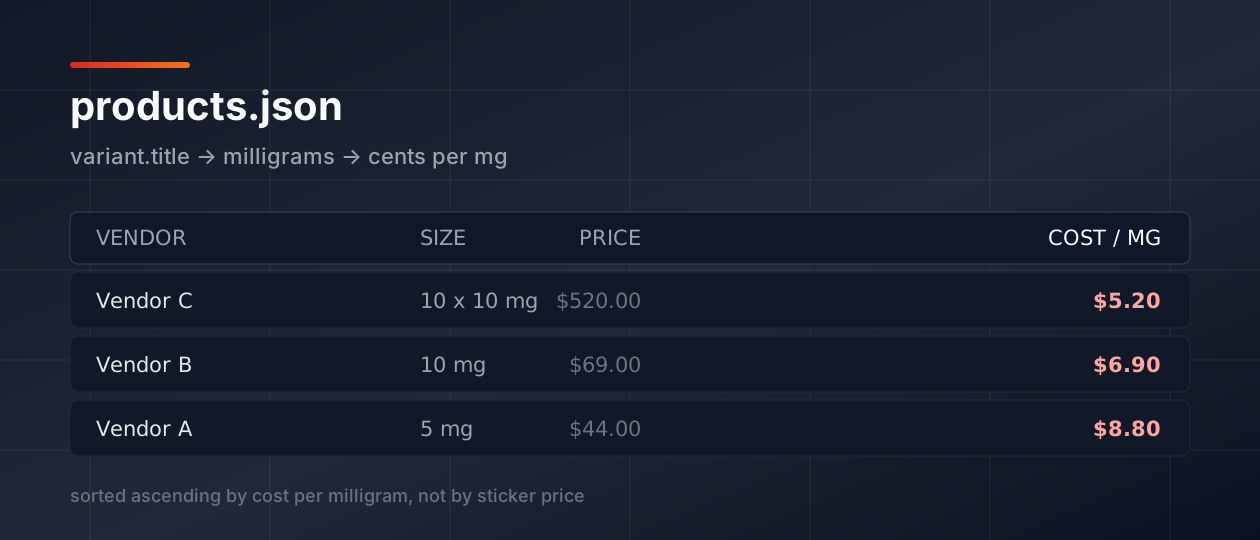
Here is the comparison that started the rebuild, with the real shape of the numbers:
- Vendor A — 5 mg vial at $44.00 → 4,400 ÷ 5 = $8.80 per mg
- Vendor B — 10 mg vial at $69.00 → 6,900 ÷ 10 = $6.90 per mg
- Vendor C — kit of ten 10 mg vials at $520.00 → 52,000 ÷ 100 = $5.20 per mg
Sorted by sticker price the order is A, B, C. Sorted by cost per milligram it inverts completely: Vendor B is about 22% cheaper than A, and Vendor C about 41% cheaper, despite carrying a price tag nearly twelve times larger. That inversion is the entire value of the page.
Shipping deserves one more derived column if you can get it. A vendor at $6.90 per mg with $35 flat shipping and a $200 minimum is not cheaper than a $7.40 vendor shipping free, for anyone buying a single vial. I model a nominal one-unit order — item price plus flat shipping, before any threshold discount — and label the column "delivered, 1 unit" so nobody mistakes it for a universal figure.
Caching the snapshot and picking a rebuild cadence
Do not fetch on page request. Every visitor triggering six outbound crawls is slow, fragile, rude to the merchants, and guaranteed to break the first time one of them is down. Write a snapshot instead — a single JSON artefact with a generated_at timestamp, the per-store currency, and the flat array of normalised rows — and have the page read only that file.
Six hours is a sensible cadence for retail pricing. Prices move on promotions and restocks, not by the minute, and a six-hour window keeps you at four crawls a day per store. On Vercel that is a cron entry plus a route handler:
{
  "crons": [
    { "path": "/api/refresh-prices", "schedule": "0 */6 * * *" }
  ]
}
The rule that matters most: never publish an empty or partial snapshot. If a store times out, keep its previous rows and stamp them with their own older checked_at. If the whole run fails, exit non-zero and leave yesterday's file untouched. A stale table with an honest date on it is a working page; a table that empties itself because one storefront had a bad Tuesday is an outage your readers see before you do.
Render that timestamp visibly, near the table rather than buried in a footer. "Prices checked 11 August 2026, 06:00 UTC" is the single line that stops the emails asking whether the page is maintained.
Rendering a table that survives a phone screen
Comparison tables are where responsive design goes to die. The two approaches that actually hold up are horizontal scroll with a pinned identity column, or a full reflow to stacked cards below the breakpoint. Pick one; the half-measures are what produce a table that is technically visible and practically unusable.
.price-table-wrap { overflow-x: auto; }

.price-table th:first-child,
.price-table td:first-child {
  position: sticky;
  left: 0;
  background: #fff;
}

.price-table td.num {
  text-align: right;
  font-variant-numeric: tabular-nums;
}
tabular-nums is a two-word change with an outsized effect: it forces every digit to the same advance width so decimal points line up down the column, which is the whole reason a reader can scan for the smallest number without reading each row. Right-align numeric cells and left-align text cells, never the reverse.
Sort server-side by cents_per_mg ascending so the correct answer is on screen before any JavaScript runs, then layer click-to-sort on top as an enhancement. Give the per-milligram column visual weight — larger, darker, first after the vendor name — and set the sticker price in muted grey. Design the hierarchy to match the analysis, or readers will keep scanning the number they recognise.
Keep the wrapper's overflow container focusable with tabindex="0" and give it an accessible name. A scrollable region that only responds to a trackpad excludes keyboard users from half your data.
Detecting drift when a store rewrites its listings
The pipeline will not fail loudly. It will fail by returning fewer rows, and it will keep doing that until someone notices the table looks thin. A store renames 10mg to 10 MG Vial (Lyophilised), splits one product into three, or changes a handle, and your parser quietly returns null for a dozen variants that used to work.
The defence is a diff against the previous snapshot before you overwrite it:
function guard(prev, next) {
  const shrink = (prev.rows.length - next.rows.length) / prev.rows.length;
  if (shrink > 0.2) throw new Error(`catalog shrank ${(shrink * 100).toFixed(0)}%`);

  const unparsed = next.skipped.length / (next.rows.length + next.skipped.length);
  if (unparsed > 0.1) throw new Error(`${(unparsed * 100).toFixed(0)}% unparsed`);

  for (const row of next.rows) {
    const before = prev.byKey[row.key];
    if (!before) continue;
    const move = Math.abs(row.centsPerMg - before.centsPerMg) / before.centsPerMg;
    if (move > 0.4) console.warn("suspicious move", row.key, before.centsPerMg, row.centsPerMg);
  }
}
Thresholds around 20% row shrinkage and 10% unparsed have been about right for me — tight enough to catch a theme migration on the run it happens, loose enough that a store pruning its catalog before a restock does not page anyone. The 40% per-milligram move is a warning rather than an error, because occasionally it is a genuine sale; in practice, four times out of five it has been a unit parse bug, usually a store switching a product from milligrams to micrograms.
Then read review.json once a week. It takes about fifteen minutes, it is the least interesting part of the job, and it is the reason the table is still right eight months later.